Neural networks run in floating point by default. Weights are floats, inputs are floats, and every layer multiplies them together. This post is about throwing that away: taking a trained network and running it in pure 8-bit integers, without losing accuracy.
It’s the first half of a journey. Here we get the math right in integers. In a follow-up, we’ll take that exact integer recipe and build the actual circuit that runs it. But first, the numbers.
the problem
Floating point is comfortable, and on a GPU you barely think about it. But a float multiply is expensive. The chip has to pull apart two numbers, multiply the fractional parts, add the exponents, normalize, handle the corners. That’s a big circuit. It burns energy and it takes space.
On a big GPU that’s fine. On a sensor, a microcontroller, or a small chip at the edge (a smart doorbell, a hearing aid, a camera), you don’t have that budget. You have a little silicon and a little power.
Integers are the opposite. An 8-bit integer multiply is a tiny circuit. Cheap, fast, low power.
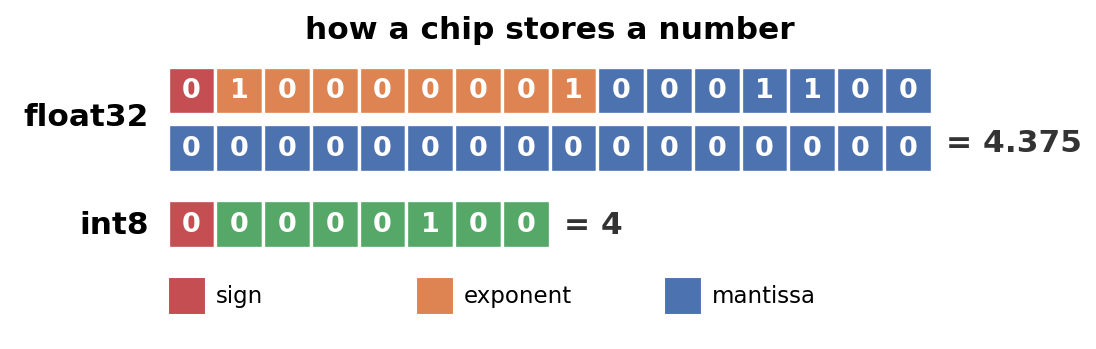
Under the hood, a float32 packs every number into 32 bits, split across three parts: a sign, an exponent, and a mantissa. Multiplying two of them means juggling all three. An int8 is just 8 bits holding a whole number. (If you want the full story on how floats work, this video is a great watch.)
And multiplying two of those int8s is the cheap part. In base 2 it’s just shift-and-add: you walk along the bits of one number (say the 5), and wherever it has a 1 you add a shifted copy of the other number (the 6); wherever it has a 0, you add nothing.
6 = 110,   5 = 101

   00110     bit 0 of 5 is 1  →  write 6 (110)
   00000     bit 1 of 5 is 0  →  write nothing
 + 11000     bit 2 of 5 is 1  →  write 110 shifted left 2
   -----
   11110     = 30
A handful of AND gates to make the shifted copies, a few adders to sum them, done. A float multiply does all of that on the mantissas and adds the exponents and renormalizes and rounds. Same multiply, buried under a pile of extra work.
So the question for this post is:
Can we run a real, trained neural network using only 8-bit integers, and not lose accuracy?
Let’s walk through how, number by number.
a tiny network
To follow every number by hand, we keep the network small. The task is MNIST: classify a 28×28 grayscale image of a handwritten digit as one of 0 to 9.
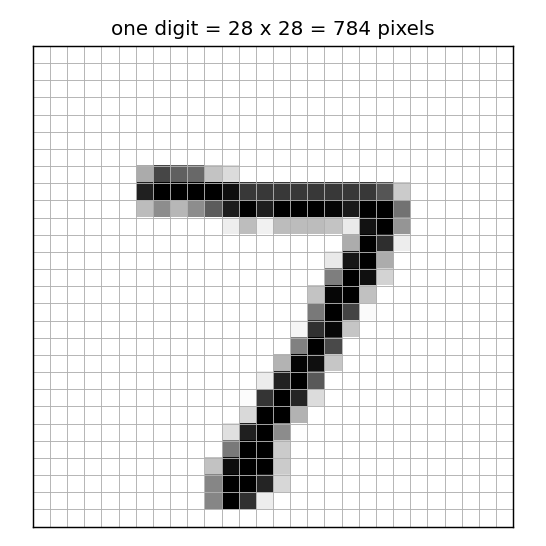
One image is a 28×28 grid of grayscale pixels. That’s 784 numbers.
We read that grid row by row into one long list, so each image becomes 784 numbers between 0 (black) and 1 (white):
[0.00, 0.00, 0.00, ..., 0.51, 1.00, 0.93, 0.17, ..., 0.00, 0.00] # 784 valuesMost of them are 0 (the dark background); the nonzero ones trace the stroke of the digit. That list of 784 numbers is what we feed into a network about as plain as it gets:
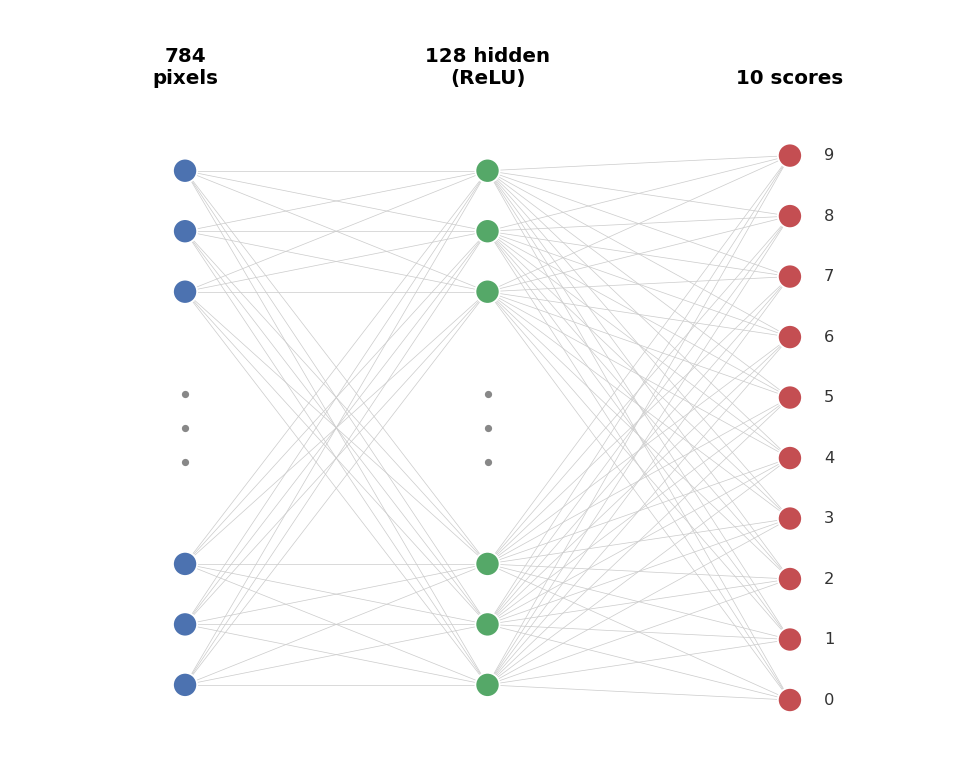
Each of the 10 outputs is a score, one per digit; the biggest score wins. Trained in plain float32, the network gets 97.76% on the test set.
That 97.76% is the number to protect. Everything we do from here is in service of keeping it while throwing away the floats.
the atom
Everything rests on one small trick: how do you store a real number as a small integer?
You’re working with two ranges. The integer is on a budget: an 8-bit integer only runs from qmin to qmax (for unsigned 8-bit, 0 to 255, that’s values). And the real numbers you care about have their own span, from x_min to x_max.
Line them up at the ends: the smallest real maps to the smallest integer, and the largest real to the largest. Take a small example, to keep it readable: reals from -1 to 2.5, and just 8 integers, 0 to 7, instead of 256. That fixes two points (each one is a real value and the integer code we store it as),
and two points are all you need to fix a straight line, a plain y = ax + b through those two corners. The real coming in is the input, so it goes on the horizontal axis; the integer code we store it as goes up the vertical one. But codes are whole numbers, so that line gets rounded to the nearest one, and the map you actually use is a staircase:
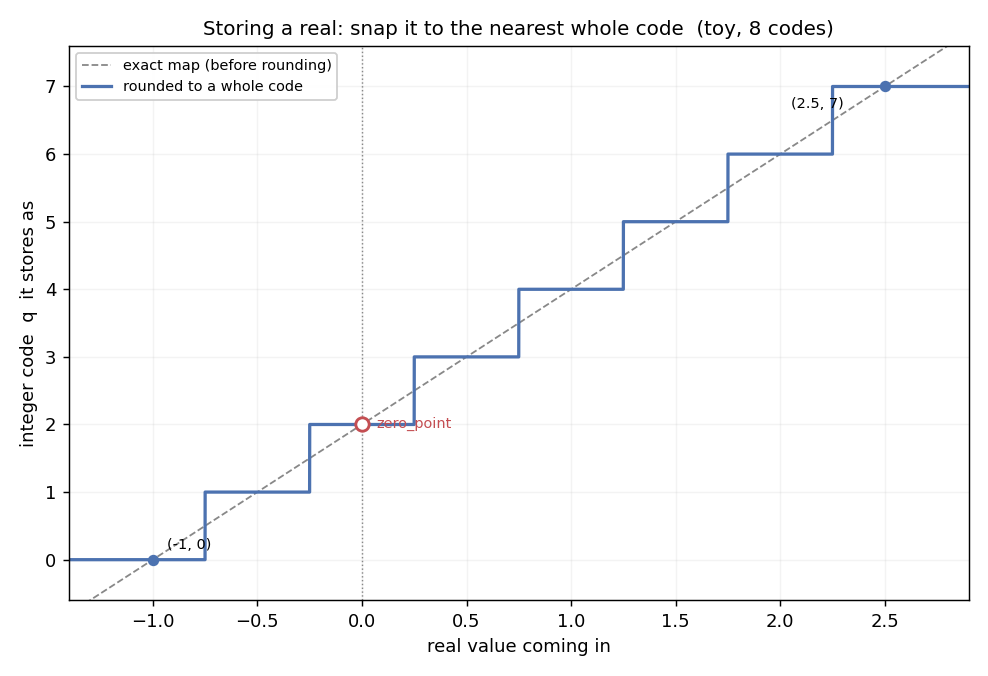
Storing snaps each real to the nearest whole code: dashed is the exact map, solid is what you actually store. The toy has only 8 codes, so the steps are coarse and the gap to the line is the rounding error.
The line is a function, q(real) = a·real + b, and it gives us the two numbers we keep.
Its slope a is rise over run, straight off the figure: how many codes you climb per unit of real, the integer range over the real range.
The scale is the flip of that, how much real one code step is worth, and it is the number we actually store:
The zero_point is the constant b. Evaluating the line at real = 0 gives q(0) = b, so b is the code that real 0 lands on. That is what b means; to get its value, use the one point we already know, the corner: real -1 stores as code 0, that is q(-1) = 0.
A whole integer, so zero_point = q(0) = b = 2, and the store line is q ≈ 2·real + 2. With both numbers in hand, the line runs both ways, and both directions earn their keep:
Storing is the staircase above: take a real (the input) and land on the nearest whole code. Reading is the inverse, the line the other way: take a stored code and get back the real it stands for. Storing rounds, because q has to be whole.
Reading the codes back, the 8 integers cover the range like this:
q = 0  →  0.5 × (0 - 2) = -1.0
q = 1  →                  -0.5
q = 2  →                   0.0   ← zero_point (exactly real 0)
q = 3  →                   0.5
q = 4  →                   1.0
q = 5  →                   1.5
q = 6  →                   2.0
q = 7  →                   2.5
That’s the whole grid. Any real number snaps to the nearest rung. Take 0.8:
to integer:  round(0.8 / 0.5) + 2 = round(1.6) + 2 = 4
back to real: 0.5 × (4 - 2) = 1.0
So 0.8 becomes 4, which reads back as 1.0. The 0.2 gap is the rounding error, the price of only having 8 rungs. With 256 rungs instead of 8, the grid is 32× finer and that error shrinks to almost nothing. That’s the bet of 8-bit quantization: 256 rungs is plenty.
two rulers: weights and activations
Everything in the atom built one thing: a ruler. That’s the scale-and-zero_point line, the integer codes laid out like tick marks across a span of real values, so you can read a real off a code or a code off a real. Now, two kinds of numbers flow through the network: the weights (fixed, learned during training) and the activations (the data, different for every image). They have different shapes, so each gets its own ruler.
Weights cluster around zero, a tidy bell curve with roughly as many negatives as positives. A range centered on zero means the zero_point is just 0, and the ruler simplifies to real ≈ scale × q. For the first layer, the scale came out to 0.003525. So a weight stored as the integer -9 means:
-9 × 0.003525 = -0.032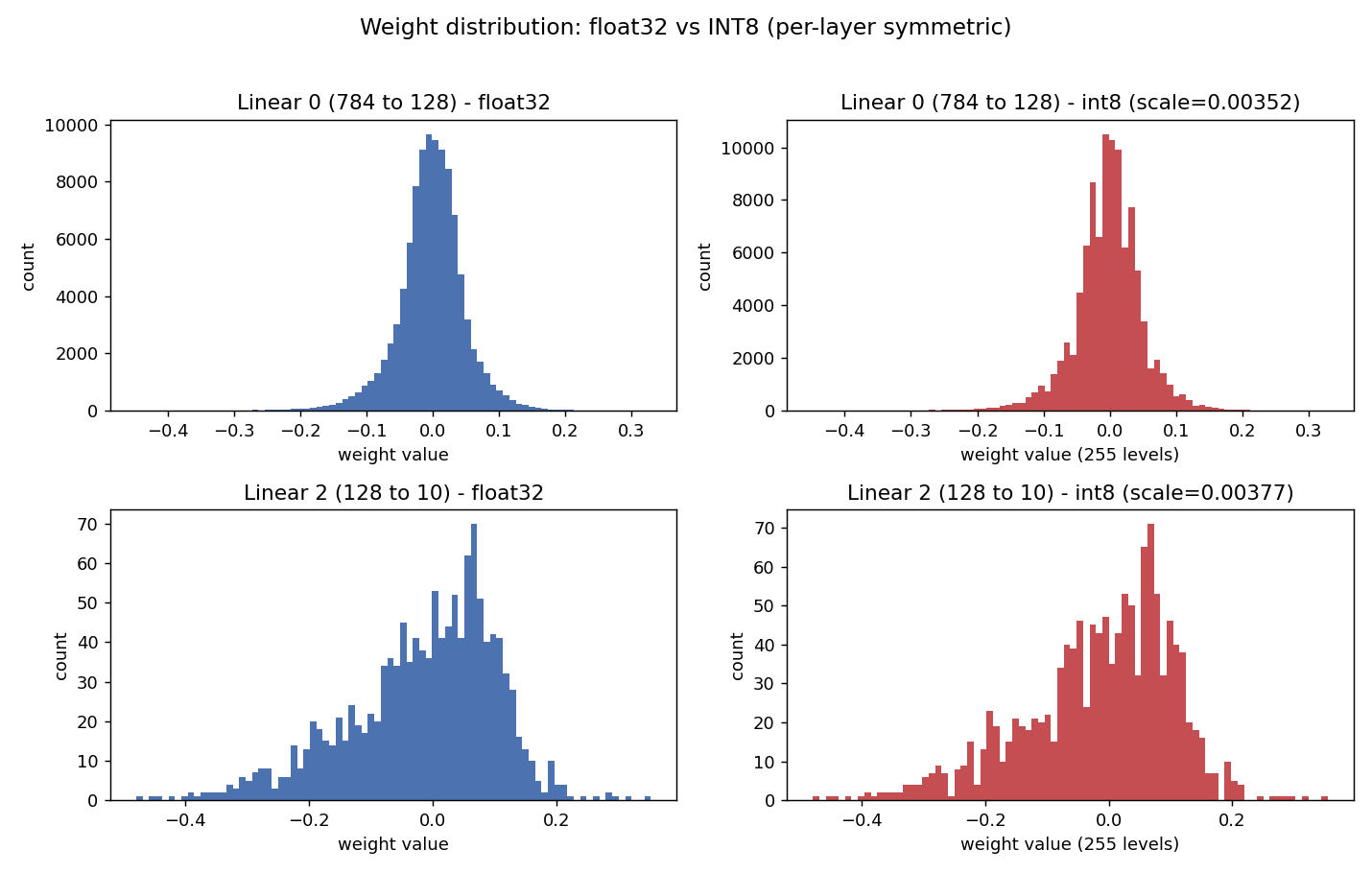
Each layer’s weights before (blue) and after (red) int8 quantization: the same bell, just snapped onto 256 discrete levels. Close enough that the accuracy barely moves.
Activations are lopsided. Take the input image. Each pixel is first normalized the standard way: subtract the dataset’s mean brightness (0.1307) and divide by its standard deviation (0.3081). That turns the old [0, 1] range into about -0.42 for a black pixel and 2.82 for a white one. Mostly positive, and not centered on zero. Now remember the codes only run from 0 to 255, never negative, and the zero_point is just which code real 0 lands on. Pin it at 0 and real 0 would sit at the very bottom of the ruler, so nothing below zero could be stored: the darkest pixels, down at -0.42, would have no code to land on and would all get forced up to 0.
So we slide the ruler down by running the atom’s exact recipe on this range. The two corners are (-0.42, 0) and (2.82, 255). The slope is codes per real, and the scale is its flip:
The zero_point is the intercept b, fixed by dropping the bottom corner (-0.42, 0) into the line (real -0.42 stores as code 0), exactly like (-1, 0) was in the toy:
Same corners, same slope, same intercept as the toy, just with the real numbers. Spelled out exactly, the ruler is scale = 0.012728, zero_point = 33.
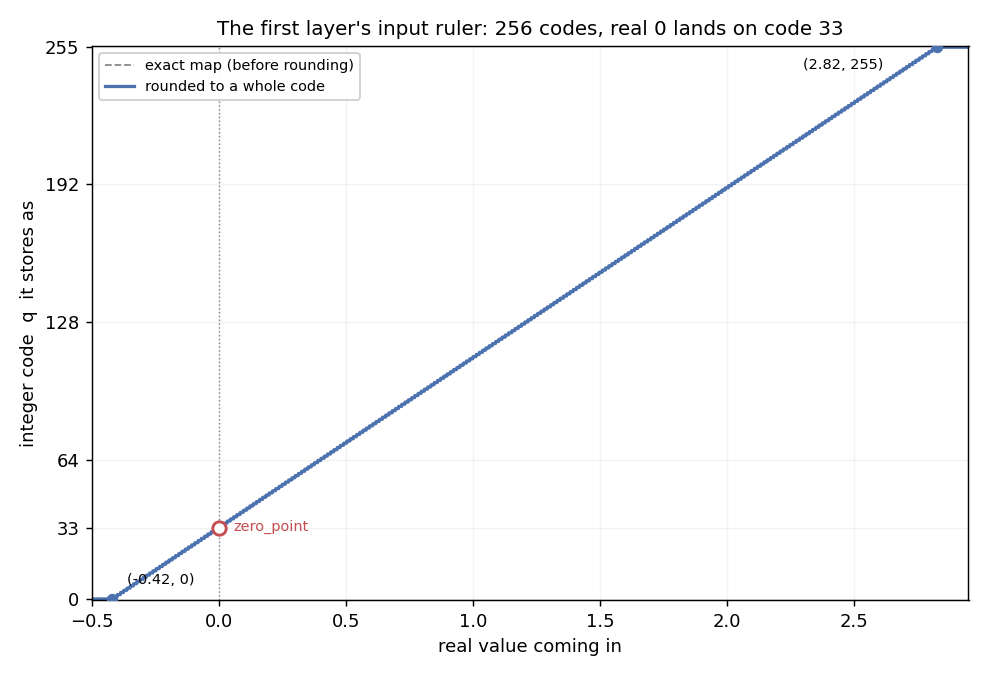
The input ruler. All 256 codes fall across the real range, real zero parked at code 33. With 256 steps the staircase is so fine it sits right on the line.
So real zero lands on code 33 instead of 0, and the 256 codes cover the lopsided range with none stranded outside it. That’s the whole job of zero_point: for symmetric things like weights it’s 0 and you can forget about it; for lopsided things like activations, it earns its keep.
doing the math in integers
A layer of a neural network is, at heart, a dot product: multiply each input by its weight, add them all up. Both sides are integers now, so it’s an integer dot product, exactly what cheap hardware loves.
But there’s a catch, and it comes straight from the rulers. The weights sit on a centered ruler (zero_point = 0), so a weight byte is clean. The image sits on the shifted one, where real 0 landed on code 33, not code 0. So a pixel that is really 0 is stored as the byte 33.
Watch what that does to a single term. Say that zero pixel meets a weight of 5. The pixel is 0, so it should add nothing to the sum. But its stored byte is 33:
5 × 33 = 165 ← the pixel is really 0, so this should have been 0165 from nowhere. And every pixel has the same problem: its stored byte is always 33 higher than the code that matches its real value (the q − 33).
So take a tiny neuron with 3 inputs. Stored bytes q = [33, 112, 72], which after taking the 33 off are [0, 79, 39], and weights [5, 2, −4]:
should be (q − 33):  5×0  + 2×79  + (−4)×39  =  2
raw (the stored q):  5×33 + 2×112 + (−4)×72  =  101
The raw sum is off by 99, and the 99 is not random:
101 − 2 = 99 = 33 × (5 + 2 − 4) = 33 × (sum of the weights)There it is in one line: multiplying the raw bytes always adds 33 × (sum of the weights). The pixels dropped out, so it depends only on the weights, never on the image. The same number for every image, so we work it out once.
Better still, we never subtract it live. We drop it into the bias, the constant the neuron already adds. The real first neuron’s 784 weights add up to 1240, so the fixed amount is 33 × 1240 = 40920, and with its bias of 363 its single baked-in constant becomes:
363 − 40920 = −40557At runtime the neuron just multiplies the raw bytes, sums them, and adds −40557. The 33 is handled inside a number it was adding anyway, and only here at the first layer: after the ReLU every activation is ≥ 0, so the next layer’s input ruler is centered at 0 again, with nothing to correct.
One last thing: the running total needs a big box. An 8-bit number counts no higher than 255. But multiply two of them and you land in the tens of thousands, and summing all 784 products climbs into the millions, around 25,000,000 for one neuron. That’s far past what 8 bits can hold, and past 16 bits too (those stop near 65,000). So the inputs and weights stay 8-bit, but the running sum is held in a 32-bit accumulator, with room into the billions. Tiny operands, roomy total.
(One conversion is still hiding between the two layers: the 32-bit total from layer one has to become an 8-bit input for layer two, back onto a ruler. Pulling that off with integers only is a neat trick, and it’s the heart of the next post.)
the moment of truth
Quantize the whole network (weights to 8-bit, activations to 8-bit), run it entirely in integers, and measure.
float32:  97.76%
int8:     97.75%
One hundredth of a percentage point. Essentially free. We threw away the floats and the network didn’t notice.
what’s next
So we have a network that runs end to end in 8-bit integers and keeps its accuracy to a hundredth of a percent. The whole thing is now adds, integer multiplies, and a couple of constants. No floating point anywhere.
But notice the sleight of hand: this is still Python, doing integer arithmetic on a regular CPU. The whole reason to go integer-only was cheap, simple, low-power hardware. So in the next post we take this exact integer recipe and build the actual circuit (in Verilog, running on a simulated FPGA) and check that the silicon agrees with the math, number for number, all the way down.
Float → int8 first. Then int8 → silicon.